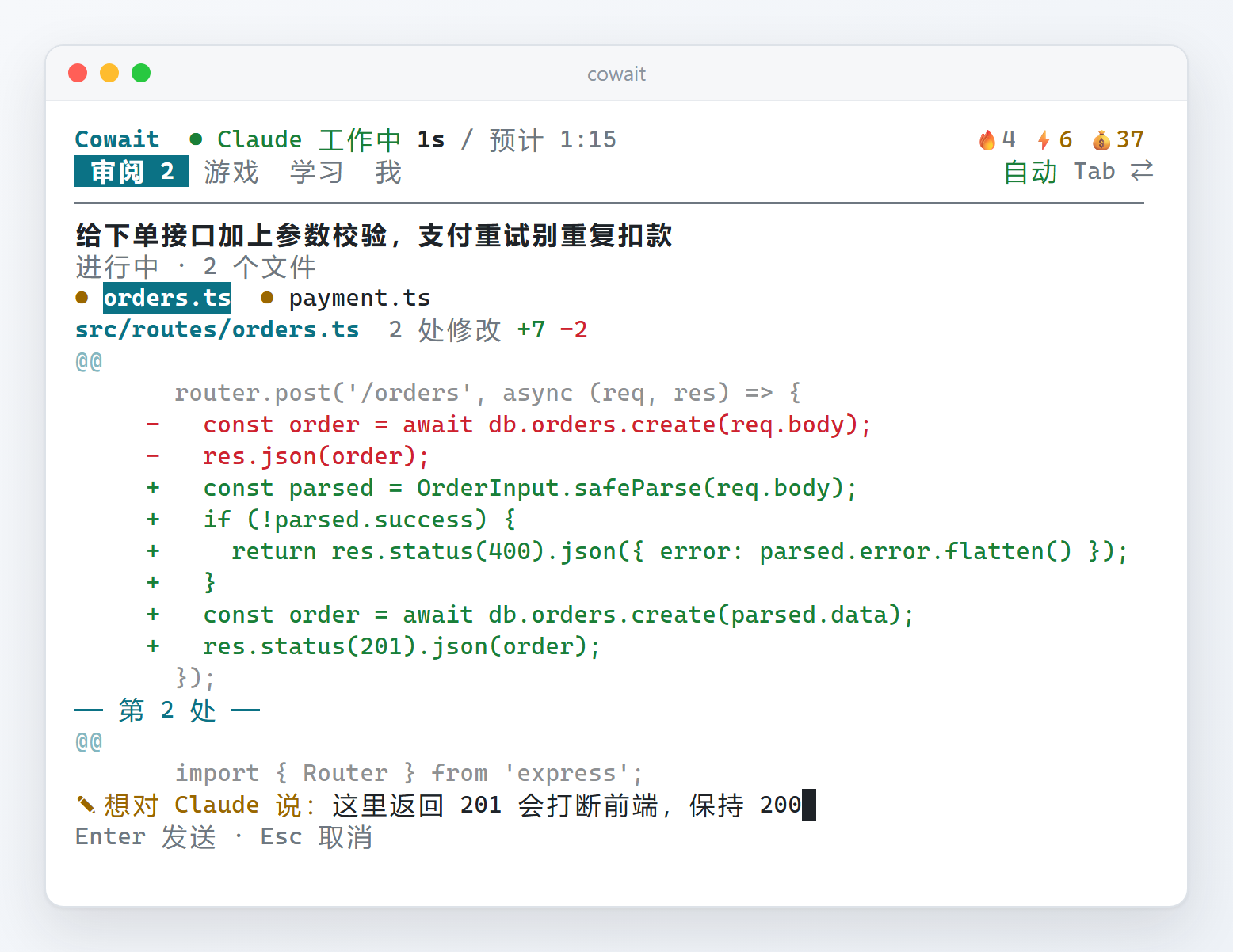
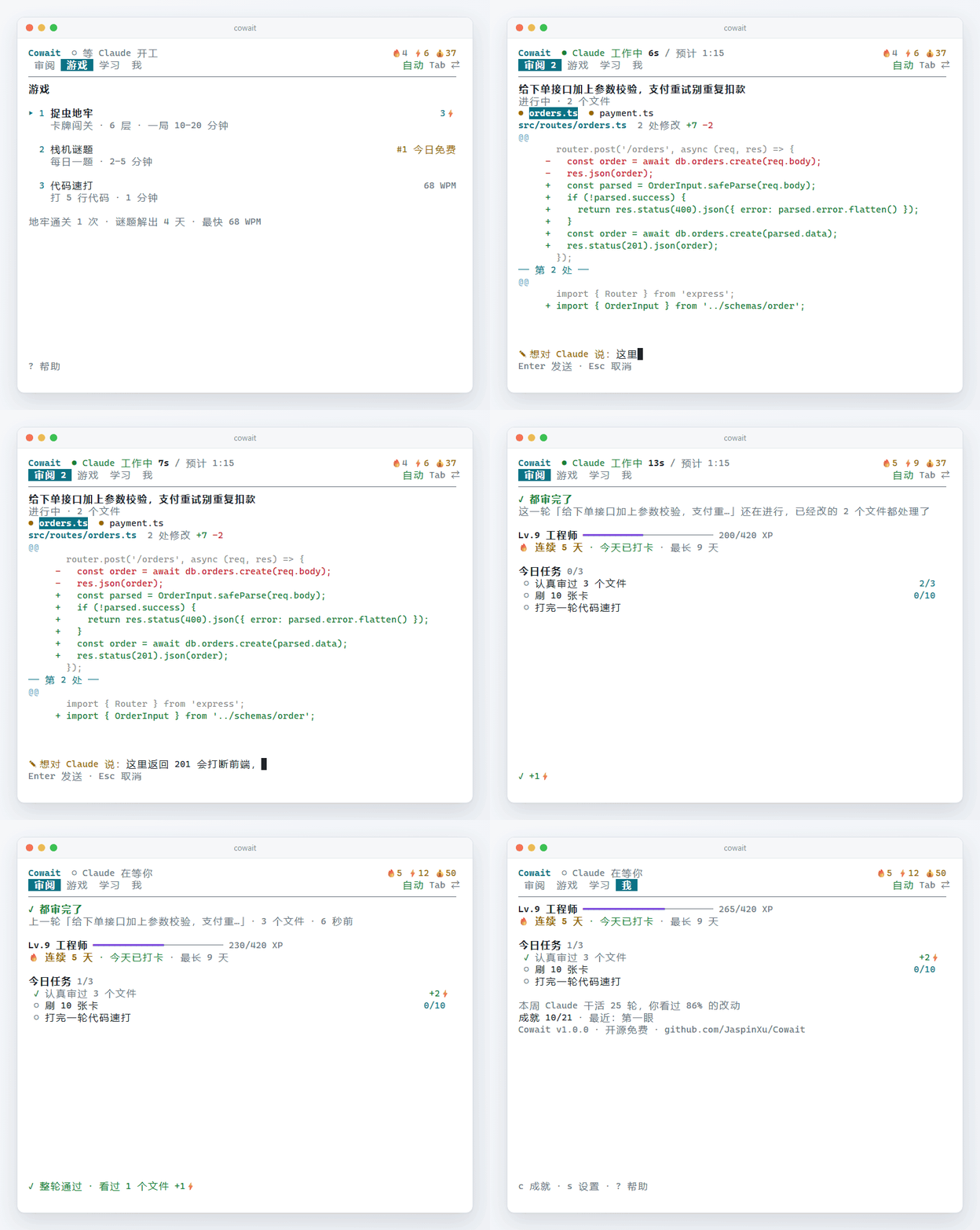
Cowait 是放在 Claude Code 旁边的小面板。每一轮改了哪些文件一目了然,有问题写一句话,Claude 下一步就看到,不用打断它。看完了,玩一局、解一道每日谜题,或者刷几张卡。
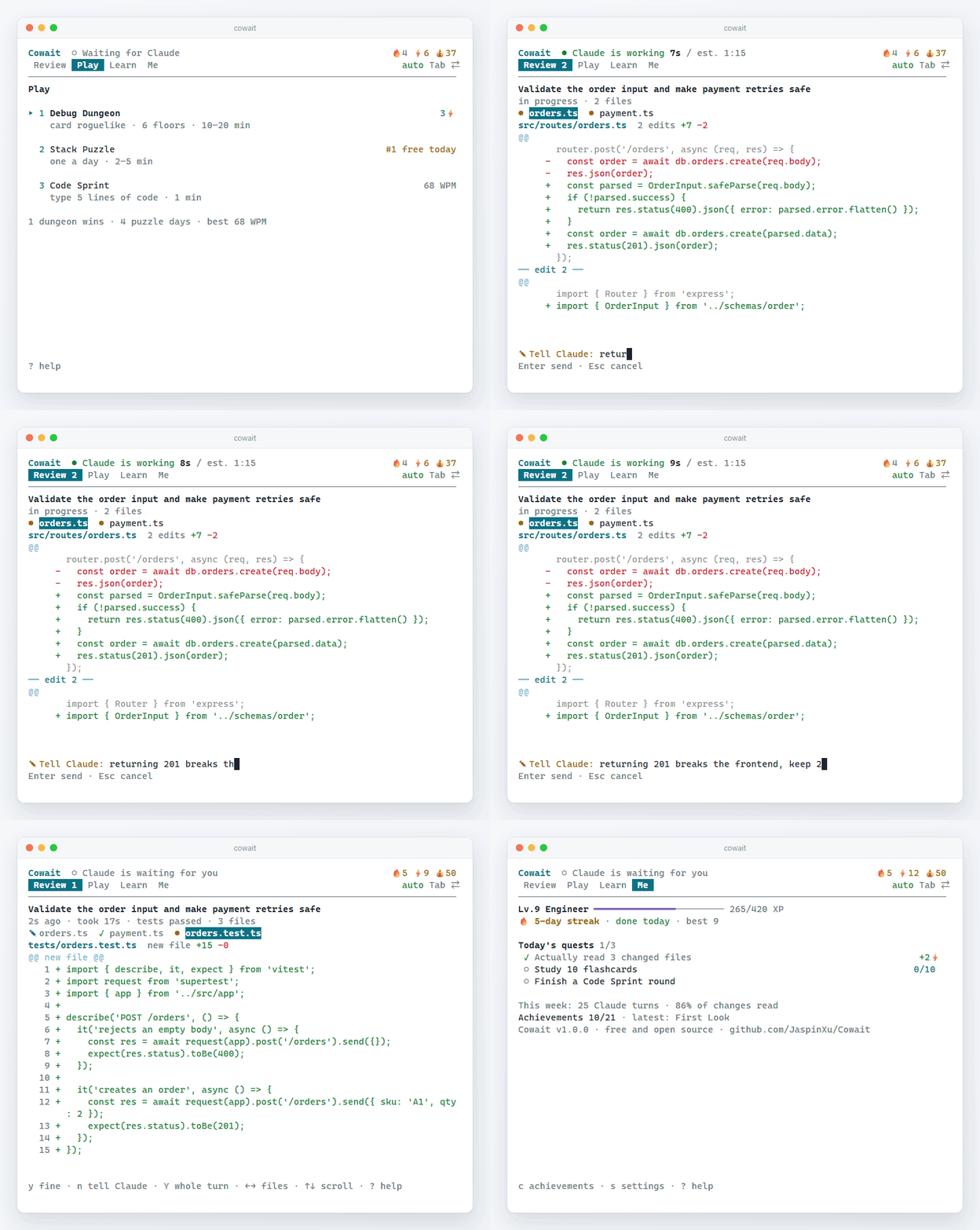
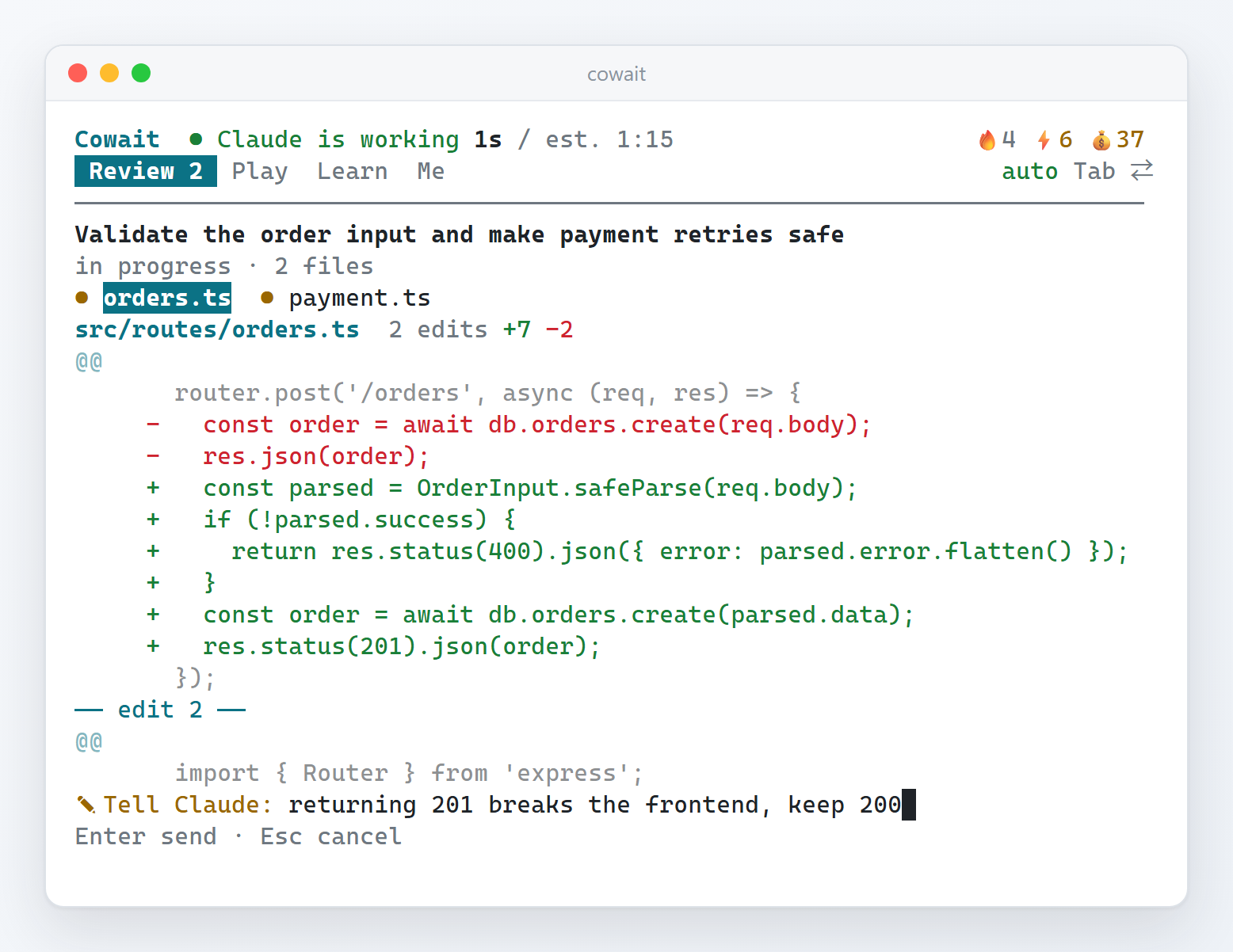
Cowait is a small panel next to Claude Code. Every turn's files at a glance, and one line from you reaches Claude on its next step, no interruption. Done reading? Play a round, solve the daily puzzle or study a few cards.
npm install -g cowait-cli需要 Node.js 20 或更新版本。Needs Node.js 20 or newer.
然后在项目里运行Then, in your project, run cowait split,按一下 Enter 就接入好了。 and press Enter once to hook it up.
这是 Claude Code 一天要来回几十次的那段时间。别的工具让你在这段时间里走开,Cowait 让你留在工作里。
The stretch of time you sit through dozens of times a day. Other tools pull you away from it; Cowait keeps you in the work.
你给 Claude 派了个活。面板开了新的一轮,标题就是你说的那句话。
You give Claude a task. The panel starts a new turn, titled with what you asked.
Claude 改了 orders.ts,它马上出现在面板里。你开始看。
Claude edits orders.ts and it shows up at once. You start reading.
你发现一个问题,写了一句话。Claude 下一步就看到,不用按 Esc。
You spot a problem and write one line. Claude sees it on its next step; no Esc needed.
Claude 干完了,面板响铃:改了 3 个文件、测试通过。按 Enter 看剩下的。
Claude is done and the panel rings: 3 files, tests passed. Enter shows the rest.
都看过了。解一道今天的栈机谜题,顺便想想下一句话。
All read. Solve today's Stack Puzzle while you think of the next message.
每一轮一组:你当时说的话、用时、测试结果,下面是这一轮改过的文件。同一个文件改了几次就合在一起看。只有在屏幕上停留够久的改动才算审过,所以覆盖率这个数是可信的。
One group per turn: what you asked, how long it took, whether tests passed, then its files. Several edits to one file are read together. Only changes that stayed on screen long enough count as reviewed, so the coverage number means something.
捉虫地牢:回合制卡牌闯关,海森堡虫、内存泄漏团、栈溢出。栈机谜题:每天一道,所有人同一题,解完能分享。代码速打:照着打 Claude 刚写的代码。
Debug Dungeon: a turn-based card roguelike against Heisenbugs and memory leaks. Stack Puzzle: one a day, the same for everyone, made to share. Code Sprint: type the code Claude just wrote.
一个键一步,随时能停。开游戏的能量,靠认真审代码来赚。
One key per step, stop any time. The energy to play is earned by actually reviewing.
间隔重复的抽认卡:内置 Git、网络、并发、LLM、系统设计五个卡组;也可以让 AI 按任意主题出题,或者直接拿 Claude 刚改的代码考你。
Spaced-repetition flashcards: five built-in decks on Git, networking, concurrency, LLMs and system design, AI decks on any topic, or a quiz on the code Claude just changed.
经验只来自有用的事:审过的文件、标出的问题、刷过的卡、解出的谜题。设置也都在这里,不用记命令。
XP only comes from useful things: files read, problems flagged, cards studied, puzzles solved. Settings live here too, no commands to remember.
Cowait 用 MIT 协议开源。所有功能都免费,没有付费版,也没有账号。代码就在 GitHub 上,可以随便看、随便改。
Cowait is MIT licensed. Every feature is free; there is no paid tier and no account. The code is on GitHub to read and change.
在 GitHub 上点个 StarStar it on GitHubnpm test 再提 PR。界面改动请在 60 列的窄分屏里看一眼中英文。
Run npm test, then send a PR. For UI changes, check both languages in a 60-column pane.AGENTS.md:约定、架构、踩过的坑都在里面。
Point it at AGENTS.md first: conventions, architecture, known pitfalls.不会。hook 是一个没有依赖的小程序,每次几十毫秒,永远以 0 退出,带 4 秒硬超时。它不挂在工具调用之前(PreToolUse),只在之后记一笔。
No. The hook is a tiny dependency-free program that takes a few tens of milliseconds, always exits 0 and has a hard 4-second timeout. It never runs before a tool call (no PreToolUse), only after.
不会。改动只存在你自己电脑上。会联网的只有两件事:每天最多一次查有没有新版本,以及你主动让 AI 出题时把主题或几处 diff 发给模型。都可以关掉。没有账号、没有统计、没有遥测。
No. Diffs stay on your machine. The only network calls: at most one version check a day, and the topic or a few diffs when you ask the AI for a deck. Both optional. No account, no analytics, no telemetry.
Windows、macOS、Linux。cowait split 能在 Windows Terminal、tmux、zellij、WezTerm、kitty、iTerm2 里自动分屏;别的终端自己开一个窗格运行 cowait 就行。
Windows, macOS and Linux. cowait split opens the pane for you in Windows Terminal, tmux, zellij, WezTerm, kitty and iTerm2; elsewhere, open a pane and run cowait.
cowait uninstall 只删 Cowait 自己加的 hooks,其他配置原样保留;安装时也会先备份 settings.json。
cowait uninstall removes only the hooks Cowait added and leaves everything else alone; installing backs up settings.json first, too.